Wild Thorn: A Bold New Sans Serif with a Unique Vibe
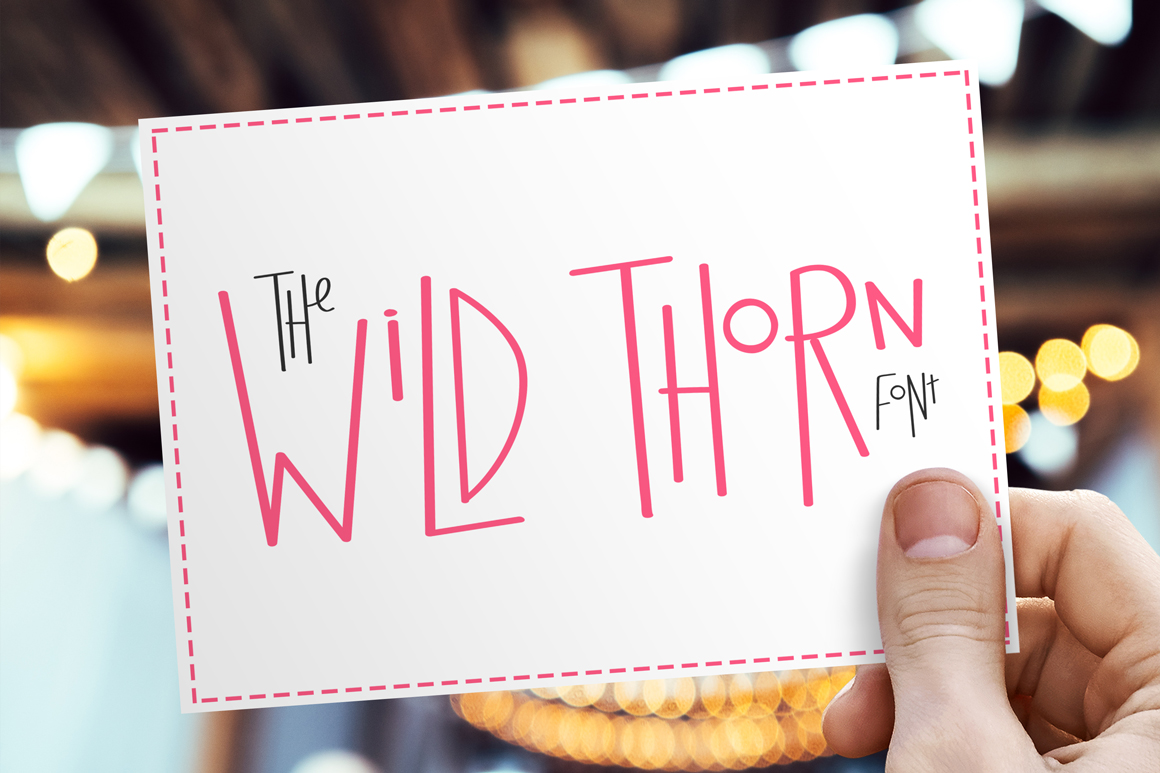
If you're looking for a font that stands out without being over the top, Wild Thorn might be just what you need. This new sans serif font brings a fresh, energetic feel to any design project, making it ideal for everything from branding to social media posts. With its fun combination of tall and small letters, Wild Thorn offers a unique aesthetic that can elevate your work in seconds.
But like any tool, using Wild Thorn effectively requires more than just downloading it. There are common mistakes people make when choosing and applying this font that can affect the overall quality and impact of their designs. Understanding these pitfalls can help you get the most out of Wild Thorn and avoid unnecessary frustration.
Common Mistakes When Using Wild Thorn
One of the most frequent errors is assuming that a bold or attention-grabbing font automatically means better results. While Wild Thorn has a strong personality, it’s not suitable for every project. Using it in a professional setting where clarity and readability are key can backfire, leading to a confusing or unprofessional appearance.
Another mistake is not considering the context in which the font will be used. For example, if you're designing a website or app, you need to ensure that Wild Thorn works well across different screen sizes and resolutions. Failing to test it in real-world scenarios can result in poor user experience and lower engagement.
Some users also overlook the importance of pairing Wild Thorn with complementary fonts. A mismatched font combination can make your design look cluttered or unbalanced. Instead of relying solely on Wild Thorn, consider how it interacts with other typefaces to create a cohesive visual identity.
How to Avoid These Mistakes
To avoid these issues, start by understanding the purpose of your design. Ask yourself: What message do I want to convey? Who is my audience? If you’re targeting a younger, more casual demographic, Wild Thorn could be a great fit. However, if your audience expects a more traditional or formal tone, you may need to rethink your font choice.
Before finalizing your design, test Wild Thorn in various environments. View it on different devices and in different lighting conditions to see how it performs. This step can help you catch any potential issues early on and make necessary adjustments.
When pairing Wild Thorn with other fonts, choose ones that complement rather than compete. A simple, clean sans serif like Lato or Open Sans can balance out the boldness of Wild Thorn, creating a more harmonious look. Experiment with different combinations to find what works best for your specific project.
What to Check Before Using Wild Thorn
Before you dive into using Wild Thorn, make sure you understand the licensing terms. Some fonts come with restrictions on commercial use, and failing to comply can lead to legal issues down the line. Always check the license agreement to ensure you’re allowed to use the font in your intended context.
Also, verify that the font is available in the correct format for your needs. Wild Thorn may come in different weights or styles, and using the wrong one can affect the overall look of your design. If you’re unsure, reach out to the font’s creator or support team for guidance.
Finally, consider the accessibility of your design. While Wild Thorn has a distinctive style, it should still be readable for all users. Avoid using it in small text sizes or in low-contrast situations, as this can make it difficult for some people to read.
Realistic Examples and Better Approaches
Imagine you're designing a logo for a music festival. Wild Thorn could add a fun, edgy vibe that matches the event’s theme. However, if you use it in a large block of text on a website, it might become hard to read. Instead, use it for headings or short phrases where its uniqueness can shine without overwhelming the reader.
Another example is a marketing campaign for a tech startup. While Wild Thorn might seem trendy, it could clash with the sleek, modern aesthetic that many tech companies aim for. In this case, a more minimalist font would likely be a better choice, even if it doesn’t have the same flair as Wild Thorn.
By focusing on the right applications and avoiding common pitfalls, you can make the most of Wild Thorn while maintaining professionalism and clarity in your designs.
Final Thoughts on Wild Thorn
Wild Thorn is a versatile and expressive font that can add character to your designs when used correctly. However, its success depends on your ability to understand its strengths and limitations. By avoiding common mistakes, testing it thoroughly, and pairing it thoughtfully, you can create visually appealing and effective work that resonates with your audience.
Whether you're a designer, marketer, or content creator, Wild Thorn offers a fresh alternative to more conventional fonts. Just remember that the goal is to communicate clearly and effectively—Wild Thorn is a tool to help you do that, not a substitute for good design principles.